Posted on February 4, 2014 at 2:17 pm
Internet commerce is emerging in a short time and helps people to avoid wasting extra money. In step with eMarketer eCommerce sales will grow from $225.5 billion in 2012 to $434.billion in 2017. As the various products being sold online are digital it’s really easy to get decent discounts and save up some cash. The following article I’ll share among the hacks for purchasing best design deals on the net.
Cheap domain names
Every website, wouldn’t it be a blog, shop, app page or social network needs a website name. The so called “dot com boom” is greater than ever however the problem is that the majority of definitely the right .com names are taken and to be able to re-buy them from owners for you or your startup it may cost from $100 to $1 million (fb.com domain name was sold for $8.5 million).
Use Domai.nr to hack domain name and notice which of them are available in.
Get a cost-effective .co domain name that is getting an increasing number of accepted by the realm as .com domains are taken.
Check for discount codes for GoDaddy and you’ll get a site for as low as $0.99/year.
You’ll surely want a hosting to host your website so check for hosting that gives free domain name. To call a number of: Bluehost, WPWebhost, Squarespace.
Join an associates program of GoDaddy or alternative company to get special discounts and use them for yourself or your clients.
Join programs for startups
As startups have become more popular globally there are a lot websites providing special discounts or perhaps free services for startups. To use for these programs you will have to purchase a site or prove that you’re working in a startup area.
F6S Deals

Rewardli

Go.CO

Special design deals for designers & developers
There are numerous of deal websites specifically created for designers and developers. Get new software, design templates, learning resources and a whole lot design resources like brushes, fonts, mockups, textures, stock photos and more. Prices vary from as low as $1 to $97 however the value you get is fantastic money and time saver ultimately.
BundleHunt

Software, tools and design resources.
Dealotto

Get discounted software, learning materials and design resources with a gamble to win everything at no cost.
My Design Deals

Generally design resources including fonts, textures, stock photos and able to use templates.
Mighty Deals

Courses, ebooks, design resources, software and templates.
Design TNT

Design resources including vector graphics, templates, Photoshop brushes and tutorials.
InkyDeals

Templates, ebooks and design resources like mockups, vector graphics and icons.
DealFuel

Design resources, WordPress theme, software and learning materials.
Design Cuts
 0
Design resources including textures, fonts, templates, mockups, icons and more.
Summary
As you will see now, it’s possible to save lots of handsome profit as much as 95% of the cost in case you spend a while for research. Hopefully these resources in this article can assist you save money and time engaged on your projects whether for yourself or your clients. Happy shopping.
Here’s another articles that you’ll definitely find useful.
Top Gadgets for Designers
 1
Not Using CSS Preprocessors? You have to be.
 2
Should an internet Designer Understand how to Code?
 3
How to stroll At the Road Towards Website design Excellence
 4
How to apply Keywords for SEO and Web Sustainability
 5
Posted in Web Design
Posted on February 2, 2014 at 8:38 am
Designers are very creative people and always strive for unique experiences, products and services that deliver high-quality and noteworthy experience. There are dozens of gadgets available on the earth but only the perfect ones come to be at the desks or pockets of creatives.
I have collected some top-notch gadgets which can be delivering extreme quality, solving problems, entertaining you and easily making your more efficient. Try these outstanding gadgets to yourself or get one to your friend or colleague.
Draw iPhone Case & Stand

Classy looking leather case for your iPhone from Hard Graft. This iPhone case also transforms into an appropriate stand so that you can use your iPhone as a bedside alarm clock, music or movie player.
Wellograph

Wellograph is an exceedingly beautifully designed activity tracker, a heart rate monitor and a running watch in a single that delivers live, insightful information regarding the wearer’s activity through simple infographic interface.
Coin

Coin simplifies your life by solving an extremely common problem – bulky wallet stuffed with too many mastercards. Using Coin you’ll be capable of put your whole cards into one.
Canon Lens Mug

Most of designers like photography and low. This creative cup design is a 1:1 simulation to the Canon Lens. For those who get this creative cup, you will adore it such a lot.
Intuos Pro

Intuos Pro Large Professional Pen Tablet is a top-clas “toy” for any digital designer. This innovative pen tablet combines Wacom’s finest pen capabilities with intuitive multi-touch gestures and far more.
Nexus 7

Mobile devices are becoming better, faster and more powerful. Nexus 7 tablet is crucial tablet which lets you enjoy full HD movies, read books and even design.
Beloit 12 Speakers

Beloit 12 Speakers from Bang & Olufsen is wireless and conveyable music system on your digital devices. Timeless design and amazing features.
Pebble Smartwatch

Wearable tech is this type of words you’re hearing more often nowadays. Pebble smartwatch is among the preferred gadgets with smart apps, personal customization and more.
Transporter Sync Private Cloud

Your own private cloud. Identical to Dropbox but 100%. Automatically sync all of the files you decide between your computers.
Fitbit

Flex wireless activity & sleep wristband is another great gadget that allows you to improve the standard of your life. Designers are likely to work so much in front of a pc what’s not very healthy. Fitbit can assist you exercise by making it a gamified process.
Cable Fondler
 0
Very simple and gorgeous solution for managing your cables easily and effectively. Keep the cables you need in your desk perpetually. Suits many common cable types.
iPad Air
 1
Apple iPad Air is likely one of the most advanced tablets on this planet. Extremely powerful entertainment and work gadget with and skill to increase its features by millions of apps.
Digital stylus for Paper iPad app
 2
Elegant digital stylus pen with a natural look exclusively designed for an award-winning iPad App Paper will provide you with freedom for expressing yourself on digital screens. Compatible with other tablets too.
iBamboo
 3
iBamboo is an electricity-free speaker constituted of a single piece of bamboo. The natural resonance of the bamboo amplifies the sound produced by the built-in speaker inside the iPhone 4/4S and the iPhone 5.
Slate Mobile AirDesk
 4
Slate Mobile AirDesk is cut from a block of pure, premium bamboo. Simply create your portable work desk by putting a laptop, mouse, cellphone or tablet in this ultra lightweight, super strong desk.
Here’s any other articles that you’ll definitely find useful.
Not Using CSS Preprocessors? You ought to be.
 5
Apple Dictates the World’s Visual Design
 6
Should an internet Designer Know the way to Code?
 7
How to stroll At the Road Towards Website design Excellence
 8
How to exploit Keywords for SEO and Web Sustainability
 9
Posted in Web Design
Posted on January 31, 2014 at 3:42 pm
Illustrations and hand drawn elements can add personality to an internet site while grabbing the user’s attention. And provided that you don’t turn your page into a demonstration frenzy, there are several how one can incorporate these elements on your project. You’re able to add subtle illustrated icons, hand draw type, or big and ambitious illustrated backgrounds. It’s as much as you. To indicate you that once properly used, illustrations could be very effective, we’ve gathered a couple of inspiring examples. Try it out.
About the Author

I love communication, technology, web, design, movies, gastronomy and creativity. Web writer, portuguese/english translator and co founding father of @refilmagem & @mentaway
Twitter: @gismullr
Here’s another articles that you’re going to definitely find useful.
Posted in Web Design
Posted on January 29, 2014 at 8:51 am
Since web designer don’t have time to create everything themselves, it’s important to find new files which might be utilized in design projects. That’s why we search the internet to locate new and useful stuff so you might download at no cost. Today we now have several different free PSDs here for you, from iPhone mockups to UIs and more. We’re certain you’ll discover a use for them in a single of your upcoming projects.
About the Author

I love communication, technology, web, design, movies, gastronomy and creativity. Web writer, portuguese/english translator and co founding father of @refilmagem & @mentaway
Twitter: @gismullr
Here’s any other articles that you’re going to definitely find useful.
Posted in Web Design
Posted on January 27, 2014 at 7:28 am
CSS was both a superb innovation and a missed opportunity. Having the ability to separate the shape and the content of a webpage massively improves the method of website design. But, CSS has a few limitations. As anyone who has ever written CSS knows, for all however the most basic of web sites, the CSS can become a tangled mess of repetitions, overrides of previous CSS, and overrides of overrides. CSS doesn’t agree to coding best practices, and its simplicity steps over the road from simple to simplistic, frequently hindering the design and development process.
Thankfully, CSS preprocessors provide us the various features that might ideally were included in CSS from the start. There are a range of alternative CSS preprocessors, with the most well liked being SASS and no more. There are significant differences between both, but in place of looking closely at particular preprocessors, we’re going to take a look at how CSS preprocessors as a matter of fact can change how you have faith in writing CSS.
 Image by Naiara Abaroa
What Is A CSS Preprocessor?
Put simply, CSS preprocessor languages are more feature-rich than CSS alone and may be processed into CSS that works as normal.
As the name suggests, CSS preprocessors take a text file, process it, and output correct CSS. Exactly what that text file contains depends upon the person preprocessor, but both SASS and fewer are a superset of CSS. They include everything already inside the CSS specification plus additional features. a first-rate advantage of that’s that in case you know CSS, you could already write valid LESS and SASS, and just ought to learn some extra tricks.
Variables, Mixins, and Functions
CSS doesn’t include variables. Anyone accustomed to coding understands how useful variables may be. Variables allow web developers to assign a price to a reputation, that can then be used during the stylesheet. If you want to modify the price, you simply ought to change it in a single place, as opposed to hunting through the entire CSS files for each instance.
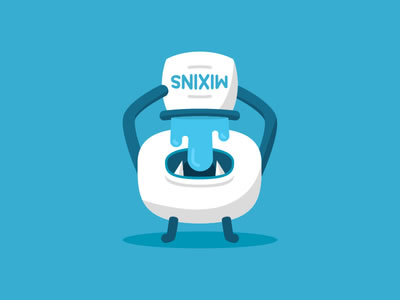 Image by Chris Michel
Mixins are slightly more complex. They permit for the properties of a category to be embedded in another class, that may then be used within the stylesheet, in much an analogous way as a variable. Functions are much as you may anticipate finding in every other programming language, although with some limitations.
It Will Make Your CSS DRY
“Don’t Repeat Yourself” is without doubt one of the foundational best practices of recent coding. With CSS alone it’s almost impossible to stick to, but with SASS, LESS and the others, variables, mixins, and functions allow developers to write down their styles in a single place, and use them throughout their stylesheets.
CSS Preprocessors Will Prevent Time
 Image by Mario Bieh
All of the inefficiencies within the way CSS is written and maintained soak up loads of developer time. Using a CSS preprocessor drastically simplifies the duty of writing readable, maintainable CSS, which means that developers and architects have more time to work at the really important stuff, like making the positioning look good.
If you’ve been avoiding CSS preprocessors, perhaps it’s time you gave them a glance. They’ll prevent time and they’re really easy to benefit for anyone already acquainted with CSS.
Here’s any other articles that you may definitely find useful.
Should an online Designer Know the way to Code?
How to stroll At the Road Towards Website design Excellence
Best jQuery Plugins of 2013

How to make use of Keywords for SEO and Web Sustainability
10 Resources That will help you Become More Active inside the Website design Community

Posted in Web Design
Posted on January 25, 2014 at 9:01 am
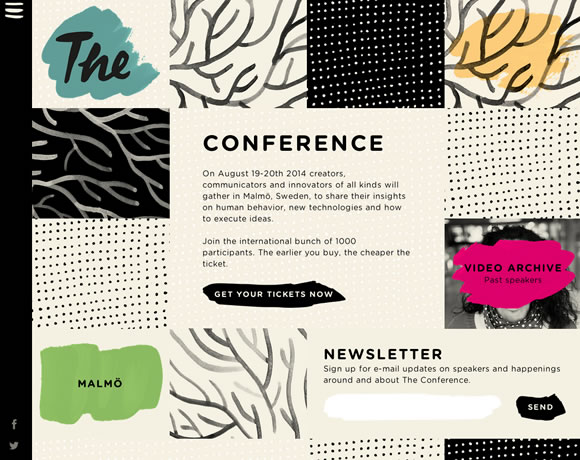
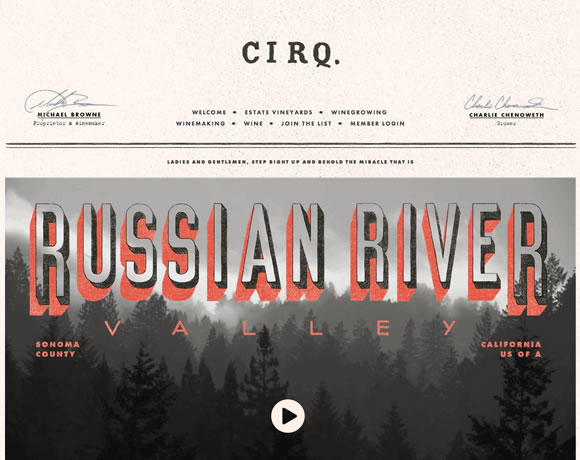
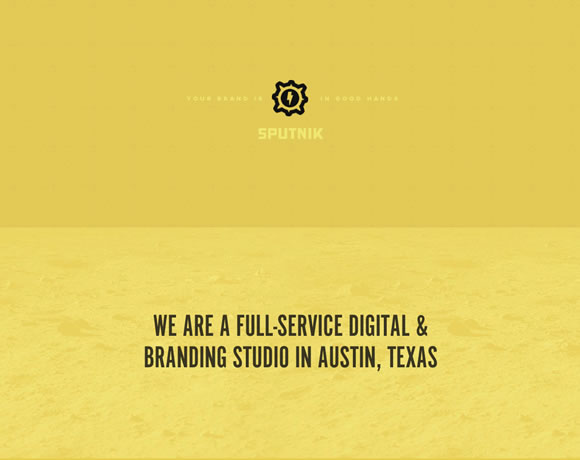
A lot of trends come and go in website design, but textures and patterns are always around. an excellent use of textures and patterns can add personality, depth and interest to an internet site. That is probably explanation why these are still popular among designers. Today, to prove that textures are still around, we’ve got some inspiring examples of sites using them. From super subtle textures, to special colorful patterned backgrounds, there are some beautiful examples here.
The Conference
Cirq
RSQ

Shiner

Lemonade

Tradestone Confections

Designeat

Names for Change

Sputnik Creative
Switch

Tiny Footprint Coffee
 0
Circles Conference
 1
The Tea Factory
 2
About the Author
 3
I love communication, technology, web, design, movies, gastronomy and creativity. Web writer, portuguese/english translator and co founding father of @refilmagem & @mentaway
Twitter: @gismullr
Here’s another articles that you’ll definitely find useful.
Inspiration from Beautifully Designed Packages & Labels
 4
Web Design Trends for 2014
 5
13 Inspiring Examples of Whitespace in Web Design
 6
Minimalist Logos on your Inspiration
 7
13 Beautiful Examples of White Type in Web Design
 8
Posted in Web Design
Posted on January 21, 2014 at 3:18 pm
Every time Apple redesigns their software, specifically iOS, the total design industry landscape changes. Basically, everyone follows them.
This phenomenon actually makes quite a lot of sense. What’s confusing, though, is that Apple typically isn’t the primary to create new design patterns or usability trends, and Apple isn’t necessarily the main capable leader with regards to software design.
They are, however, leaders in lots of others ways, and their software design is healthier than most. That’s exactly why they set trends.
 Image via Songquan Deng / Shutterstock
It Started With Me
I see this happen to me each time a major shift happens in iOS. It started at the day the iPhone was released in 2007. i used to be blown away by the device, the design, the usability, the touch screen, the gestures… it was all so new, so cool, and very unexpected.
I remember immediately applying the foundations in their gestures and design patterns to my very own trade, which was and is designing websites and web applications. i used to be literally so inspired, and that i still believe that that day changed history and shaped every single day that came after it. The style that everybody thought of design and user interactions was totally turned the other way up.
Subsequent releases of recent iOS versions and contours evoked an analogous reaction. plenty of this has to do with Apple basing its design decisions on deep human principles, smart thinking and research. That implies that after you get it (you notice it after Apple’s done it), you already know that there are a wide variety of how to use Apple’s thinking and usefulness on your own projects and ways of fascinated about projects and users.
I Wasn’t Alone
Soon i realized that others were taking the cue to boot. When iOS first started innovating, it was long before responsive website design. If truth be told, it was largely the primary time that full, beautiful websites were viewable on cell phones. It is sensible, then, that once everyone started creating mobile versions in their websites, the plain inspiration was Apple’s native apps.
It could be hard to keep in mind, however the original native apps, before the App Store existed, were nowhere near what they’re today. Still, they were like nothing anyone had seen previously.
So mobile websites, at the beginning of the “true” mobile web, looked so much like Apple’s iOS apps. Frameworks started emerging, like jQuery Mobile and Sencha Touch, that featured simple “views” with back buttons within the upper left, nav bars around the bottom, bouncy scrolls and more. Forget loading new pages. We wanted sliding and flipping transitions between views without a load time.
Briefly, and after Android was out, there has been a push for “non Apple” mobile UIs, which translated basically to a platform agnostic, mobile-web-specific UI language. Even that looked and functioned plenty like Apple.
Then Came the App Store
 Image by Christophe Tauziet
Soon Apple unfolded their App Store and created this complete new subset of the technology/development/design industry where anyone could create their very own mobile apps. Here it really made sense to duplicate Apple’s interfaces and design styles, and it is probably what set the tone for the future years.
Now, designers and UX people had good reason to base their decisions off of the functions that users were already used to. That’s usability 101. Especially because before the iPhone, there have been no pre-existing user patterns for touch-based mobile apps.
The issue, in order to call it that, is that we now have an entire slew of various use cases and value patterns from all different mobile operating systems, mobile and responsive websites, and mobile applications. It sort of feels, though, that everybody still desires to follow Apple.
I guess it’s safe…
The Flat Design Example
Recently, essentially the mostsome of the most relevant example of the way we’re all still being led by Apple is de facto flat design.
Apple failed to invent flat design, and in reality, that you need to argue that they don’t even practice true flat design. (i do know there’s no formal definition of flat design to tell us they don’t… but they don’t.)
 Image by Leo Drapeau
Regardless of its popularity pre-iOS 7, all of the sudden, with the discharge of iOS 7, everything on the earth went flat.
I don’t mean that the Facebook, Instagram and Twitter apps updated their designs to compare the hot iOS 7 flat interface and best practices. That did happen, though.
I mean that websites became flatter to check their mobile app companions. In numerous cases, Android apps got the flat treatment besides. Taking things a step further, some very large companies even updated their logos! Yahoo, Google and Bing all released new, flatter logos right round the time Apple updated to iOS 7.
The proven fact that Apple wasn’t nearly the primary company to implement flat design helps to strengthen my point. Flat design was extremely popular amongst designers and stylish tech or design-focused companies. It was written about, debated and defined. Nonetheless it took Apple to let everyone know that “OK, it’s safe to do that now. We did it.”
Back to Me
The thing is, even in fact these years, i used to be insanely inspired by watching the Apple keynote where iOS 7 was revealed. Especially after they showed the recent photos app.
And it’s crazy, because I dislike the hot design of the “select” inputs, I dislike how the back arrow interacts with its label, and that i dislike another minor choices.
But i like how they push our whole industry forward. i admire how they thought “outside the box” and threw all previous assumptions out the window. i admire how Jonny Ive was capable of take his genius and spill it into the software side of the product.
For now, and doubtless for ages into the long run, I and everybody else will continue to repeat Apple, whether consciously or subconsciously, through Apple directly or through another individual who copied Apple originally. We’ll continue to have “aha” moments when Apple rethinks a standard user interface element. For better or worse, we’ll continue to base our aesthetic decisions on Apple’s cellphone interface.
And, really, that’s not this type of bad thing.
Here’s another articles that you’ll definitely find useful.
Focus On: Design Trends in Mobile Apps for iOS

30 Excellent iPad App Interfaces

15 Useful Web Apps for Designers

25 Inspiring Design Related Websites

35 Inspiring Mac Related Websites

Posted in Web Design
Posted on January 19, 2014 at 10:59 am
The start of a brand new year is often an exhilarating time for businesses to peer ahead and beauty what the arriving year will bring. There are many of changes in store in 2014, especially for those that work in technology and website design.
2013 saw a slew of recent trends, a number of that have begun to vanish out and others that stuck around and are still going strong. While 2014 is barely getting started, let’s look at a number of the website design trends which have began to emerge or that we will expect to determine within the coming year.
Flat Design

Flat Design was one of the crucial biggest trends to emerge in 2013 and this is going strong into the hot year. Companies from Taco Bell to Apple are dropping skeumorphism in favor of flat design by stripping their graphics of very nearly any design element that isn’t 100% purposeful within the function of the product. Apple, for instance, launched their iOS7 with an extreme flat design, stripping the design elements until they were stark naked. This involves doing away with 3-D graphics and gradients and basically just using flat shapes and indicators to assist the user have a more accessible experience.
Experimental typography

More and more designers are enjoying fonts and injecting them with new personalities. These fonts have slightly more pizazz than standard serif or san-serif fonts like Times New Roman, Helvetica, etc. We’ve already seen designers starting to add uniqueness and personality to the fonts their using in logos and on websites. A few of these may be fun and playful while others are artistic but still professional. Possible expect to look many more websites going the best way of the fewer boring font in 2014.
Slide Out Menus

Want to view the content on an internet site crisply without distraction? Slide out menus let you just do that. A slide out menu may be toggled from the head or side of your screen to bare the remainder of the site’s content in a unbroken way that doesn’t interrupt your browsing experience. It’s a pleasing approach to get where you’re going without getting distracted. It’s minimalistic and ease 2.0.
Big Background Videos

Move over single page websites that feature big beautiful images, and hello background videos. This new trend is making waves, and it isn’t hard to work out why! Imagine a wonderful video playing in your site that fills up the whole screen, providing your audience with an inside look and peak into your organization or business. When done right big background videos could make your website stick out from others, and supply an in-depth user experience were customers and readers feel connected to you and your brand in a technique never before possible.
Endless Scrolling

Scrolling through a domain is quicker and easier than having to click through links to access various information. They don’t seem to be the content-cluttered long scrolling pages of the past, either. New design techniques allow the content to be impeccably organized and formatted in a fashion that’s super easy to read and digest. Long scrolling site can change layout and design as you’re scrolling, which makes it easy to forget that you’re actually scrolling through rather a lot of knowledge.
Simple Color Schemes

2014 will see much more websites using just one or two colors rather than the attention-popping graphics and animation of the past. a brand new trend is to take advantage of one bright and clean background color, like red, orange or teal, and to incorporate images or black or white text over it. The effect is super minimalist and user-friendly.
Focus on Mobile
 Image by Yecid Sanmartin
Responsive Website design was another big trend in 2013 and now 2014 is seeing websites designed expressly for mobile use. Designers are working increasingly more on keeping sites performing on mobile devices and developers are helping the cause along too. Such things as logins, social media integration, email subscriptions, endless scrolling and lots of other features are making sites much, much easier to exploit on phones, that is where most users are turning nowadays.
Less Text, More Video

Instead of getting blurbs about what a corporate does, businesses are instead determining short videos. Because videos are easy to provide and share for your site and on social media and so they entice the fashionable attention span that desires to be wowed and entertained, videos are a good way to speak with an audience effectively.
Scroll Activated Animations

Interactivity in website design is beginning to visit a wholly new level. With scroll activated animations you could create incredible content that your audience can interact with and explore. It makes your websites truly come to life in a method never before possible. Sometime the online can feel distant and different than somebody connection, but with scroll activated animations your audience can begin to feel more involved with the digital world.
Here’s any other articles that you’ll definitely find useful.
13 Inspiring Examples of Whitespace in Web Design

13 Beautiful Examples of White Type in Web Design
 0
13 Inspiring Service & App Websites
 1
13 Minimalist Web Designs in your Inspiration
 2
11 Great Examples of Video Backgrounds in Web Design
 3
Posted in Web Design
Posted on January 17, 2014 at 12:57 pm
There are a many aspects of fine website design, and whitespace is definitely considered one of them. Whitespace is the empty space around design elements which includes images, text, columns, etc. It’s that blank space that makes layouts clean and complicated. Understand that whitespace doesn’t must be white, provided that it can be blank, any color will do the job and may deliver a clean and stylish design.
Cory Gibbons

Metta Skincare


Webydo

Bookshelf

Plainwhite

Barley


Brad Hogan

Musio

 0
Hop.in
 1
BrightByte
 2
 3
Who’s your Santa?
 4
CycleLux
 5
Suki
 6
 7
About the Author
 8
I love communication, technology, web, design, movies, gastronomy and creativity. Web writer, portuguese/english translator and co founding father of @refilmagem & @mentaway
Twitter: @gismullr
Here’s every other articles that you’re going to definitely find useful.
Minimalist Logos on your Inspiration
 9
13 Beautiful Examples of White Type in Web Design
 0
Best Web Designs of 2013
 1
13 Inspiring Service & App Websites
 2
13 Minimalist Web Designs on your Inspiration
 3
Posted in Web Design
Posted on January 15, 2014 at 7:30 am
I am always doing that which i will not do, so that i’ll how one can do it. – Pablo Picasso.
Absolutely – building websites with no less than some knowledge of HTML is way more productive than just drawing them with Photoshop. While web-designers who understand how to code still often grow to be sending their PSDs to the “real” developers, if truth be told that almost all award-winning websites are designed by code-savvy web designers. You wonder why?
It’s because both HTML and CSS are very visual languages in themselves. Also, websites become increasingly interactive. User interactions though are very difficult to foresee using only Photoshop. Whereas having code in mind always helps creating designs which have interactions in mind.
Let alone cash. If you’re a contract designer reminiscent of I previously was, knowing code will certainly broaden your range of consumers as possible become a one-stop-shop (trust me, learning how one can design takes a developer for much longer than vice versa). And while you are a company designer which include I currently am (working at ImpressPages, a user-friendly content management system), knowing as a minimum the fundamentals of coding might be useful you deliver designs which are both interaction-oriented and easier to work with as they subconsciously take developers under consideration. Simply speaking, you earn karma points that regularly translate right into a better pay.
As New Year’s resolution time is looming, learning code can be just the proper one 
Is it difficult?
Contrary to the well-liked belief, learning how you can code is so easy at first, even to an extent where it becomes addictive. However, if you’re not getting addicted originally or if you happen to don’t like self-learning, most possibly programming isn’t something you must pursue…
However, if you’re already into website design, odds are that programming is for you.
Should you choose a programming language?
At first, make sure you decide what it’s essential to do. In you’re into web solutions, HTML5 and PHP are the most well liked languages on this area. However, it becomes increasingly popular to rent developers whatever the programming languages they’re good at. Great developers always play with new technologies after they pop out. Most significantly, if someone’s good at one language, they could learn new ones very fast. So that you shouldn’t stick with a specific language, yet play with ones which might be with regards to web technologies.
Also, odds are that there are many web developers working (or perhaps living) around web designers. Take one for a lager! He’ll be very happy to inform you what languages are worth fiddling with on your environment and what’s important to bear in mind. Not to mention he’ll let you know why he would like seeing you knowing methods to code.
Where when you start?
There are a lot of useful online resources that teach the fundamentals of web development. Sadly though, there’s no single tutorial it truly is good for everybody promptly. I actually have selected a number of websites that i’ve been using during my pursuit of turning into accustomed to coding.
Dash

Dash teaches HTML, CSS, and Javascript through fun projects you are able to do on your browser. The advantage of Dash is it truly is teaches the fundamentals trough real-life scenarios, similar to “Anna’s friend Jeff needing a custom theme for his poetry blog”. The code is written within the browser and the teachings are leved-based. Is indeed is a fun strategy to learn the fundamentals for an internet designer, sadly however, only four projects (lessons) come in.
Codeacademy

Codeacademy is usually great on the subject of the fundamentals of website design. It also offers interactive lessons and it has more programming languages at the table than Dash. Codeacademy starts with HTML and CSS lessons (they call them Fundamentals), that’s truly the correct selection for the beginners. After the basics are completed, you are able to decide to learn jQuery, JavaScript, PHP, Python or Ruby.
I also like Codeacademy attributable to two separate parts it has while teaching coding: theory and practice that’s devided into web projects or APIs. This suggests it really works both for complete newbies and for ones that would like to go dig deeper.
Treehouse

While Treehouse is paid, this learning platform has an enormous choice of both programming languages and systems (corresponding to development tools or design) to choose between. Treehouse also features videos. It also has Tracks – different goals that you can set in your lessons resembling Becoming an internet Developer, Becoming an online Designer or Learning HTML and CSS. It’s very useful if you’ve got a spare buck.
W3schools
This set of tutorials is a really popular one. w3schools features both tutorials and references – the latter are frequently being explored even by experienced web developers. The web site features lessons for popular languages and technologies reminiscent of HTML, CSS, JavaScript, SQL, PHP and jQuery. It also teaches servers, databases and other vital stuff, it has greater than 1000 of code examples. It’s free. While Dash is somewhat better for newbies, W3S is extremely handy even for the pros.
LEARN JS
While JavaScript is somewhat advanced and that i does not recommend it for you because the first technology to benefit, it’s very good to be told which will work on making web plugins or mobile apps. That’s greatly favourite right away, so it’s a handy programming language to understand.
Learn-js.com is your first port of call if you commit to go JavaScript. It features an interactive board that permits to aim the code you simply wrote. The teachings are both basic and advanced.
What else?
Every developer knows stackoverflow that has millions of questions and the same amount of answers, plus a colourful community. It has saved billions of man-hours and it’ll definitely avoid wasting of a while.
Speaking of communities, Mozilla also has an excellent one with lessons and tutorials widely available.
And in fact, you want to check net tut+ with thousands of tutorials for many of issues and challenges beginners may come upon.
Here’s another articles that you’re going to definitely find useful.
How to stroll At the Road Towards Website design Excellence

How to make use of Keywords for SEO and Web Sustainability

10 Resources That can assist you Become More Active inside the Website design Community

Branding Faux Pas You Won’t Make Twice

7 Best Practices of Responsive Web Design

Posted in Web Design
« Previous Page — Next Page »